
How to Check Home Loan Eligibility in Malaysia: 4 Steps
How to Check Home Loan Eligibility in Malaysia: 4 Steps
Before you apply for a home loan in Malaysia check your CCRIS report, work out your DSR on net income, get your documents ready and compare indicative eligibility across 20 Malaysian banks with the free Lite Report.
By FinDoctor Malaysia · Last updated
Content
How to Check Home Loan Eligibility in Malaysia: 4 Steps
Quick answer: To check your home loan eligibility in Malaysia, first read your free CCRIS report on Bank Negara Malaysia’s eCCRIS portal, then work out your Debt Service Ratio (DSR) on your net monthly income. Get your income and property documents ready, and compare indicative eligibility across 20 Malaysian banks before you apply, for example with FinDoctor’s free Lite Report. The Lite Report is not a loan application and not a guarantee of approval. Each bank makes its own decision.
What should you check before applying for a home loan in Malaysia?
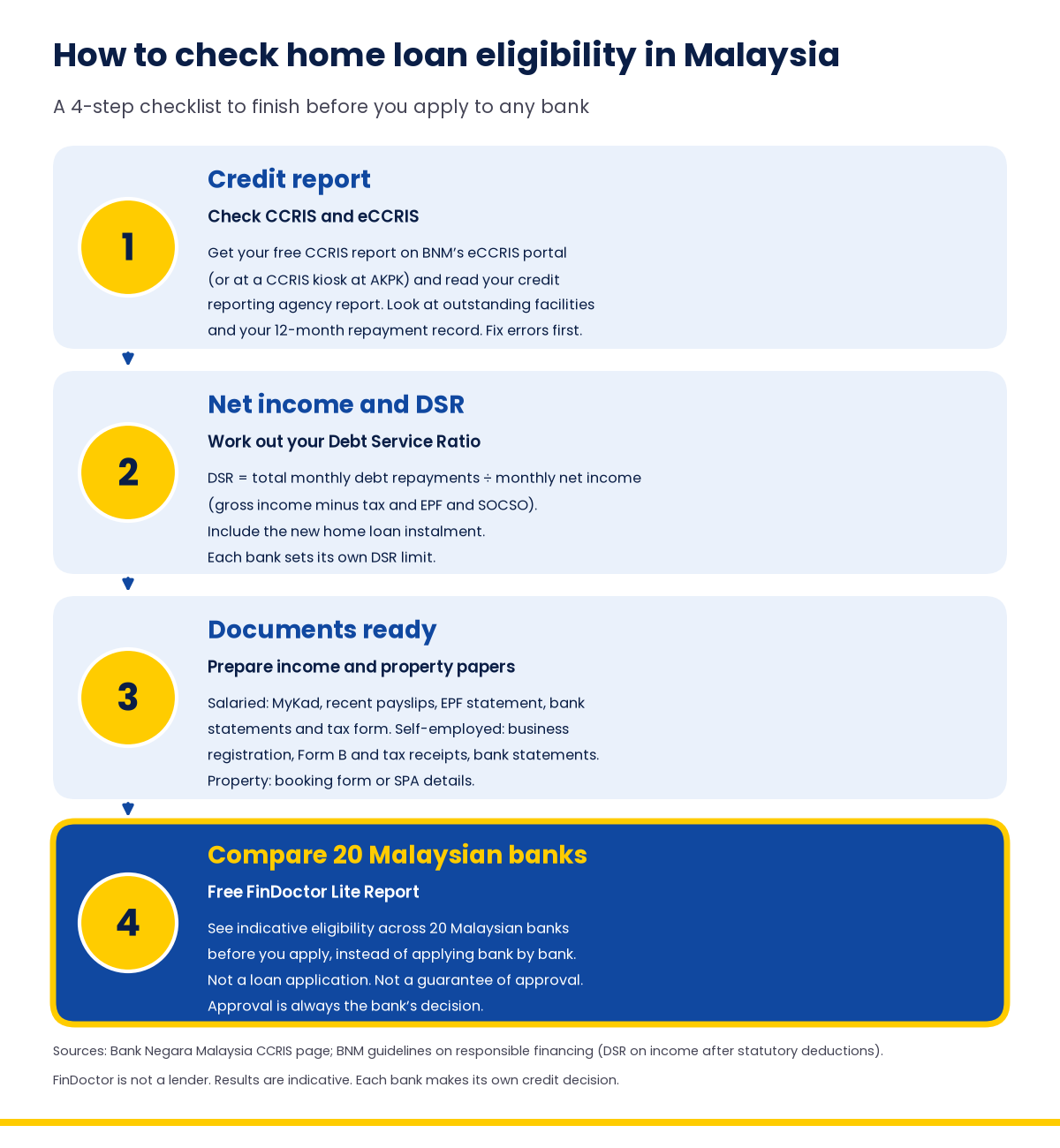
Use this pre-application checklist. Each step answers a question the bank will ask when it assesses your application.
- Check your credit reports. Read your CCRIS report on eCCRIS and your credit reporting agency report, and fix any errors before you apply.
- Calculate your DSR on net income. Add up all monthly debt repayments, including the new home loan instalment, and divide by your income after tax, EPF and SOCSO.
- Prepare your documents. Gather proof of identity, income and the property details the bank will ask for.
- Compare indicative eligibility across 20 Malaysian banks. Use FinDoctor’s free Lite Report to see where you stand before you submit any application.
How do you check your CCRIS report before applying?
CCRIS (Central Credit Reference Information System) is owned and operated by Bank Negara Malaysia (BNM). Banks and other participating financial institutions report their borrowers’ financing to CCRIS, and BNM turns that data into credit reports. You can get your own CCRIS report in three ways:
- Online on eCCRIS, for free. Malaysian citizens with a MyKad and an internet banking account can register online. eCCRIS requires multi-factor authentication through an authenticator app since 27 June 2025.
- At a CCRIS kiosk at Agensi Kaunseling dan Pengurusan Kredit (AKPK) offices nationwide, where you can also register for eCCRIS.
- Through a credit reporting agency. Credit reporting agencies registered under the Credit Reporting Agencies Act 2010 and approved by BNM can access CCRIS with your consent. They may charge a fee, and their private reports may include more information than CCRIS.
What does your CCRIS report show?
- Your credit applications: pending and approved applications from the last 12 months, with the amount applied, date and type of facility. Rejected applications are not shown.
- Your existing facilities: outstanding or active accounts, with the type of facility, credit limit, outstanding balance, instalment amount and any legal action status. Impaired loans under special monitoring are listed as Special Attention Accounts.
- Your repayment conduct over the past 12 months. If you settle arrears, the next month’s record shows it, but earlier months still show the arrears.
CCRIS is not a blacklist. BNM states that CCRIS only stores financing details and repayment history, gives no opinion or rating, and does not blacklist any borrower. BNM is not involved in lending decisions, and CCRIS is only one of many sources a bank uses to assess an application. If you find an error, ask the reporting financial institution to correct it, because only that institution can update its records. Corrections show in CCRIS on the 10th of the following month, subject to public holidays.
Why check first? Pending and approved applications appear in your CCRIS report, so several applications at once are visible to each bank that reviews it. Reading your report first lets you fix errors, clear arrears and see your commitments as the bank will see them, so you lower the risk of avoidable rejections and do not need several applications at the same time.
How do banks use DSR to assess your home loan eligibility?
Your Debt Service Ratio (DSR) is the share of your monthly net income that goes to debt repayments. BNM’s responsible financing guidelines require banks to assess affordability using a prudent DSR, based on income after statutory deductions for tax and EPF, and to consider all your debt obligations.
DSR = total monthly debt repayments ÷ monthly net income × 100%
- Net income is your gross monthly income minus tax, EPF and SOCSO.
- Debt repayments include existing loans and financing from banks and non-banks, card and other commitments, plus the instalment of the home loan you are applying for.
Illustrative example: a net income of RM6,000 with a RM900 car loan instalment, RM300 of other repayments and a new home loan instalment of RM1,800 gives total repayments of RM3,000 and a DSR of 50%. These figures are only an example.
There is no single DSR that every bank accepts. Each bank sets its own threshold and may also look at how much income you have left after commitments. Run your own numbers with the home loan eligibility and DSR calculator.
What documents do banks ask for when you apply for a home loan?
Document lists differ by bank, so confirm the exact list and the number of months required with the bank. These are the documents banks commonly ask for:
| Applicant | Documents commonly requested |
|---|---|
| Salaried | MyKad, recent payslips, EPF statement, bank statements showing salary credits, and your latest tax form or employer income statement |
| Self-employed | MyKad, business registration, latest Form B with proof of tax payment, and business and personal bank statements |
| Property | Booking form or sale and purchase agreement details, and the property’s title and price details |
Self-employed income is assessed differently from a salary, and banks may count only part of it. Prepare clean, consistent records and check how each bank treats your type of income before you apply.
Why compare banks before you apply?
Banks set their own DSR thresholds, income rules and credit policies, so the same profile can be assessed differently from one bank to the next. BNM notes that if one financial institution turns down an application, the others will not necessarily do the same. Applying blindly bank by bank, however, adds each new application to your CCRIS report while it is pending.
FinDoctor’s free Lite Report shows your indicative eligibility across 20 Malaysian banks in one place, so you can focus on the banks that fit your profile. The Lite Report:
- is not a loan application, and nothing is sent to a bank on your behalf;
- is not a guarantee of approval. Results are indicative, and approval is always the bank’s decision.
When you are ready to apply, follow our step-by-step guide on how to apply for a home loan in Malaysia. For loan types, interest rates and the overall process, see our complete guide to home loans in Malaysia.
How FinDoctor helps
Get your free Lite Report to compare indicative home loan eligibility across 20 Malaysian banks. For a deeper review, the Pro Report costs RM50, and Pro Advisory costs RM650 and adds a one-on-one online session with a credit expert; get either report at findoctor.my/report, or book Pro Advisory.
You can also use the home loan eligibility and DSR calculator to estimate your instalment and DSR first.
FinDoctor is not a lender and does not guarantee approval, rates or loan amounts. Each bank makes its own decision.
Frequently asked questions
Does checking my own CCRIS report affect my loan application?
No. CCRIS records credit applications that you make to financial institutions. Viewing your own report on eCCRIS is not a credit application.
Is CCRIS a blacklist?
No. Bank Negara Malaysia says CCRIS only stores financing details and repayment history. It is not a list of borrowers with poor repayment records.
How long do late payments show in CCRIS?
CCRIS shows a 12-month record of your repayment history. Settled arrears appear in the next month’s record but the earlier months still show the arrears.
What DSR do Malaysian banks accept for a home loan?
There is no single figure. BNM requires banks to set a prudent DSR level and each bank sets its own limit for your profile.
Is the FinDoctor Lite Report a loan application?
No. The free Lite Report is not a loan application. It shows indicative eligibility and is not a guarantee of approval.
Should I apply to many banks at the same time?
Pending and approved applications show in your CCRIS report for 12 months. Compare indicative eligibility first and then apply to the banks that best fit your profile.
Sources
- Bank Negara Malaysia, CCRIS Report (accessed 25 November 2026)
- Bank Negara Malaysia, CCRIS and eCCRIS FAQs (accessed 25 November 2026)
- Bank Negara Malaysia, eCCRIS portal (accessed 25 November 2026)
- Bank Negara Malaysia, Measures to promote responsible financing practices, 18 November 2011
- Bank Negara Malaysia, Responsible lending guidelines ensures borrowers’ affordability, 20 September 2016
This article is general information, not financial advice. Eligibility results are indicative and each bank makes its own credit decision.
Last updated: 25 November 2026

Apply Now to Get Started!
Get your personalised recommendations on which bank offers the best interest rates for you!
FinDoctor Money Tips

· FinDoc Editorial Team
How to Calculate DSR in Malaysia and How to Reduce It
Malaysian banks divide your monthly debt repayments by your net income. Here’s the formula, what counts as a commitment, a worked RM example and how to lower your DSR before you apply.

· FinDoc Editorial Team
Personal Loan Flat Rate Malaysia 2027: BNM Rules and Top-Ups
From 1 January 2027 banks can’t offer flat rate or Rule of 78 personal loans and some home loan top-ups count as personal financing. Here’s what changes and what’s already in force.

· FinDoc Editorial Team
Stamp Duty Self-Assessment Malaysia: Property Transfers 2027
From 1 January 2027 property transfers that do not involve a JPPH valuation move to LHDN’s Stamp Duty Self-Assessment System. Here is what changes and how stamping on MyTax works.