Appoint Your Tax Agent in MyTax: Form CP55 Ends 1 Jan 2027
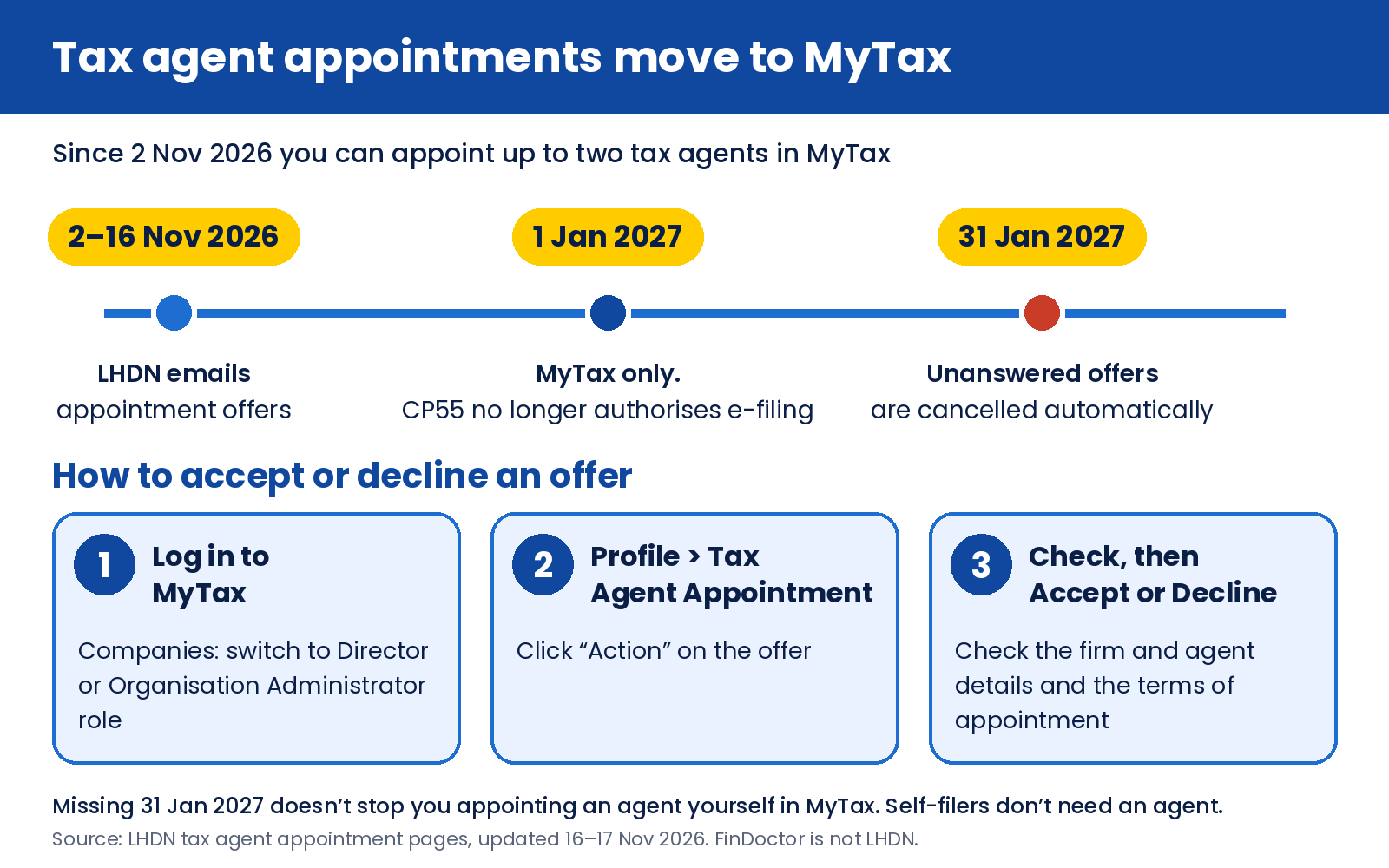
Quick answer: From 1 January 2027, if you use a tax agent, you must appoint and authorise them through MyTax, because a signed Form CP55 will no longer authorise electronic filing. If LHDN emailed you an appointment offer between 2 and 16 November 2026, accept or decline it in MyTax under Profile > Tax Agent Appointment; offers left unanswered are cancelled automatically on 31 January 2027. With or without an offer, you can also appoint an agent yourself in MyTax.
What changes on 1 January 2027?
Subsection 152A(3) of the Income Tax Act 1967 has been amended. From 1 January 2027, taxpayers who use a tax agent must appoint the agent and grant electronic filing authorisation through MyTax. The authorisation lets the agent file tax returns and carry out tax-related transactions electronically on the taxpayer’s behalf.
| Step | Before 1 January 2027 | From 1 January 2027 |
|---|---|---|
| Authorising e-filing by your tax agent | Sign Form CP55. The agent keeps the signed form for LHDN officers to review when required. | MyTax only. A manual Form CP55 no longer grants e-filing authorisation. |
| Appointing, updating or revoking an agent | MyTax appointments under the new terms have been available since 2 November 2026. | MyTax only |
| Number of agents | Up to two at any one time, from the same firm or different firms (from 2 November 2026) | |
The appointment terms in MyTax follow those set out in Form CP55. They include letting your agent see your MyTax profile and status information, such as your e-Ledger, Monthly Tax Deduction (MTD), refund status, instalments and mailbox. You can also choose to use the firm’s address as your correspondence address, in which case LHDN sends its system-generated letters, notices and statements there. Read the scope shown on screen before you submit.
I got an LHDN email offer. How do I accept or decline it?
To ease the move, LHDN emailed appointment offers between 2 and 16 November 2026 to taxpayers who meet its pre-determined criteria. The offer lets you appoint your existing firm and tax agent, previously authorised with the manual Form CP55, and grant e-filing authorisation in MyTax.
- Log in to MyTax. Type mytax.hasil.gov.my into your browser yourself. For a company or organisation, switch your role to Director or Organisation Administrator if applicable.
- Open Profile > Tax Agent Appointment. In the list of tax agent appointments, click “Action” for the offer.
- Check, then Accept or Decline. Check the firm and tax agent details and read the terms of appointment and the scope of authorisation. Select Accept to appoint and authorise that firm and agent, or Decline if you don’t agree.
When you accept, LHDN updates its records and lists the agent as your authorised representative for tax matters. LHDN publishes step-by-step guides (in Malay) for individuals and for companies and organisations.
Not sure whether an email is genuine? Don’t act on links in the email. Log in to MyTax yourself and check the Tax Agent Appointment tab, where offers are listed.
What is the 31 January 2027 deadline, and what if I miss it?
31 January 2027 applies only to the emailed offers. If you take no action by then, the offer is cancelled automatically. It is not a filing deadline.
A cancelled offer doesn’t stop you using a tax agent. You can still appoint one yourself in MyTax, as explained below, and the agent then has to accept. Because Form CP55 stops working for e-filing authorisation on 1 January 2027, check with your agent that a MyTax appointment is in place before they file for you.
How do I appoint a tax agent in MyTax without an offer?
- Check the agent. Get the firm’s name and Tax Identification Number (TIN) and the tax agent’s name. Make sure the agent’s Ministry of Finance (MOF) approval is valid; you can search the list of approved tax agents. The agent must also have activated the tax agent role in the Tax Agent e-Filing System (TAeF) through MyTax.
- Agree the terms. Agree on the appointment letter and scope of services with the agent first.
- Set up MyTax. Activate your MyTax user ID and apply for the MyTax role you need, if you haven’t already.
- Submit the appointment. Log in to MyTax, select Profile and open the Tax Agent Appointment tab. Enter the verified firm and agent details, review the terms and scope of authorisation, and submit.
- Wait for acceptance. The appointment takes effect only once the agent accepts it.
Which MyTax role should I use?
The files your agent can manage depend on the MyTax role you use when you appoint them:
| MyTax role used | Taxpayer category | Files the agent manages |
|---|---|---|
| Individual | Individual | IG, plus E if any |
| Director of Company or Organisation Administrator | Company, co-operative, LLP, trust, association, partnership, Hindu joint family, petroleum or Labuan entity | C, CS, PT, TA, TC, TR, F, P, TJ, PP or LE, plus E if any |
| Estate Administrator | Deceased person’s estate | TP, plus E if any |
| Legal Representative of Incapacitated Person | Individual in the incapacitated person category | IG, plus E if any |
| Employer (Government or Special Class only) | Government or Special Class employer | E |
How many tax agents can I appoint, and how do I revoke one?
From 2 November 2026, you can appoint up to two tax agents at any one time, from the same firm or from different firms. Review your appointments from time to time. When an agent’s services end, revoke the appointment promptly in MyTax. LHDN says it is not responsible for any risk or loss if a taxpayer or authorised person fails to do so.
Do I need a tax agent at all?
No. LHDN says taxpayers may appoint a tax agent. If you file your own return, you don’t need to appoint one, and these changes affect only how an agent is authorised. For the filing steps, see our step-by-step guide to filing income tax in Malaysia. The rules on appointing agents don’t change your tax rates or reliefs; for those, see our guide to 2027 income tax rates and reliefs.
How FinDoctor helps
FinDoctor is not LHDN and is not a lender. We don’t appoint tax agents or file tax returns. For appointments and filing, use MyTax and an MOF-approved tax agent.
Where we can help is your financing position for 2027. Get your free Lite Report to check your credit profile against 20 Malaysian banks. For a deeper review, the Pro Report costs RM50 and Pro Advisory costs RM650. You can also book a consultation to talk through your options. FinDoctor does not guarantee approval, rates or amounts; approval is always the bank’s decision.
Frequently asked questions
Can I still use Form CP55 in December 2026?
Yes. Before 1 January 2027 you sign Form CP55 to authorise your tax agent to file electronically. From 1 January 2027 the form no longer grants that authorisation and you must use MyTax.
What happens if I ignore the LHDN offer email?
The offer is cancelled automatically on 31 January 2027. You can still appoint a tax agent yourself in MyTax and the agent then has to accept.
Is the LHDN offer email genuine?
Check in MyTax instead of using the email or its links. Log in yourself and open Profile then Tax Agent Appointment where any offer made to you is listed.
Which MyTax role must companies use?
Switch to the Director or Organisation Administrator role. Then open Profile and the Tax Agent Appointment tab.
Do I need a tax agent if I file my own return?
No. Appointing a tax agent is optional and this change only affects how you authorise one.
Does this change my tax rates?
No. It only changes how tax agents are appointed and authorised. See our 2027 income tax rate guide for rates and reliefs.
Sources
- LHDN (HASiL), Transition to Online Appointments (updated 17 November 2026): https://www.hasil.gov.my/en/ejen-cukai/pelantikan-ejen-cukai-oleh-pembayar-cukai/peralihan-kepada-lantikan-secara-dalam-talian/
- LHDN (HASiL), Online Appointment of a Tax Agent (updated 16 November 2026): https://www.hasil.gov.my/en/ejen-cukai/pelantikan-ejen-cukai-oleh-pembayar-cukai/pelantikan-ejen-cukai-secara-dalam-talian/
- LHDN (HASiL), Guidance to Appoint a Tax Agent through MyTax (updated 17 November 2026): https://www.hasil.gov.my/en/ejen-cukai/pelantikan-ejen-cukai-oleh-pembayar-cukai/panduan-pelantikan-ejen-cukai-melalui-mytax/
- Ministry of Finance, list of approved tax agents (accessed 24 November 2026): https://mycukai.treasury.gov.my/portal/web/guest/carian-lhdn-public
Last updated: 24 November 2026